Introduction
Hyosung ATMs run in over 30 countries. The NH series — NH-1800, NH-2700, NH-2800 — has tens of thousands of machines in the field. They hold up well. But every machine has its weak points, and after a few years of constant use, certain parts start failing on a schedule you can practically set your watch to.
This guide covers the components that fail most often, how to catch them before they take a machine offline, and what to look for when sourcing replacements.
1. Cash Dispenser Unit (CDU) — The High-Wear Zone
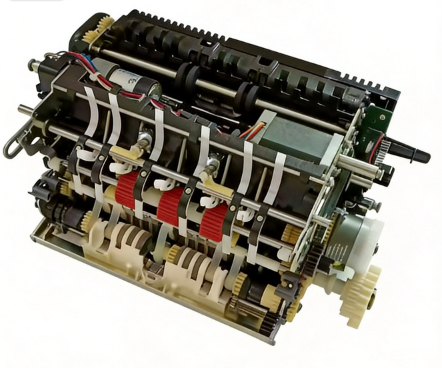
The CDU handles every single transaction. It’s where most failures start.
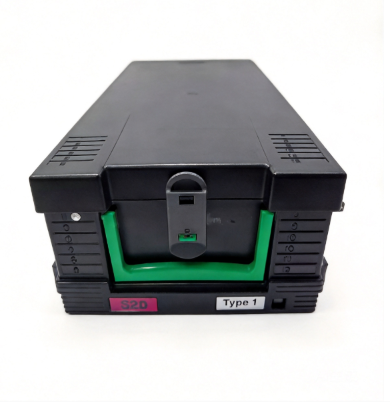
Cassette Present Switch (CS7)
This microswitch tells the CDU whether a cassette is seated. When it fails, you get Error 20001 — “No Cassette.” The machine stops dispensing entirely.
What to check before ordering: - Open Diagnostics → Sensor Status - Watch the CS7 state while pushing the cassette in - If it doesn’t flip from “Open” to “Closed” when fully seated, the switch is dead - Also check the plastic actuator tab on the cassette itself — these get brittle and snap off
Common across NH-1800, NH-2700, and MX series dispensers. If you’re ordering a replacement, bring the old switch with you or send a photo — Hyosung made running changes to the connector type between production years.
Pick Wheels and Feed Path Components
Part numbers: Feed path rebuild kit for CDU10, individual pick wheels vary by cassette model
Pick wheels wear down on high-volume machines. A worn pick wheel causes misfeeds (C0047 on NH series). The machine reports a cassette error, but the root cause is mechanical, not electronic.
Replacement interval depends on transaction volume. Machines doing 300+ transactions per day may need pick wheel replacement every 12-18 months.
Timing Wheel and Sensor
Error C0030 — “Main Motor Failure” — sounds expensive. It’s usually not the motor.
The timing wheel sensor gets dirty, or the timing wheel itself develops a cracked tooth. Clean the sensor first with compressed air. Inspect the wheel teeth under good light. If a tooth is broken, replace the wheel before ordering a motor.
2. Card Reader — The Customer-Facing Headache
Magnetic Read Head
The read head degrades with every swipe. Symptoms start subtle — intermittent read failures, customers having to swipe twice. By the time the machine logs consistent errors, the head is gone.
Replacement is straightforward on Hyosung motorized readers. On dip-style readers, check the alignment after installation — a misaligned head causes the same symptoms as a worn one.
Shutter Assembly
The shutter that opens and closes for card insertion uses a small motor and gear train. When the shutter jams, customers can’t insert cards. Common cause: dust accumulation on the gear teeth. Clean before replacing.
3. Receipt Printer — The Silent Cost Driver
“Why are my receipts fading?”
I get this one a lot. Hyosung printers use thermal heads — they don’t fail with a bang, they just slowly fade over months. Print density drops. Text gets patchy. Operators don’t notice until a customer complains that they can’t read their balance.
Test with a diagnostic print pattern, not a regular receipt. If density is below 70% of original, swap the head. Don’t wait for it to go completely blank.
“What’s jamming the printer every other transaction?”
Usually the cutter. The guillotine blade gets dull. Rough edges. Partial cuts. Customer pulls the receipt, it tears wrong, and a scrap of paper stays inside. Next person’s receipt feeds into that scrap and jams.
An inexpensive cutter blade wears out, and suddenly you’re paying for a service call that costs many times more than the part. Open the printer, pull the paper path cover, look inside with a flashlight. If you see paper shreds, clean them out and replace the cutter.
4. Power Supply Unit
Hyosung power supplies run hot. Capacitors dry out over 3-5 years of continuous operation. Early symptom: random reboots, especially during peak transaction hours when the CDU motor draws maximum current.
If a machine reboots once a month, check logs. If it reboots once a week, replace the PSU before it takes the mainboard with it.
5. How to Identify the Correct Part Number
Hyosung part numbers follow a consistent format. For NH series machines:
- 7XXXXXXXXX — 10-digit numbers, typically mechanical components and assemblies
- SXXXXXXXX — S-prefix numbers, usually electronic boards and modules
Always cross-reference with your machine’s serial number. Hyosung made running changes during production. A part from a 2015 NH-2700 may not fit a 2019 NH-2700CE even though the model name looks the same.
Check the label on the failed part itself. Take a photo. Send it to your supplier. Don’t order by model name alone.
6. When OEM Isn’t Available
Hyosung discontinues parts on a rolling basis. Once a model reaches end-of-life, OEM supply stops within 2-3 years. For machines with 5+ years of service life remaining, this creates a problem.
Options: - Original OEM stock — Some suppliers maintain warehouse inventory of discontinued OEM parts. Available while stock lasts. - Professional rebuilt / remanufactured — For electronic boards and mechanical assemblies, specialized manufacturers produce compatible replacements to original specifications. - Refurbished — Used parts tested and certified functional. Suitable for mechanical wear components, not recommended for security modules.
Quick Reference: Common Failure Symptoms
| Symptom | Likely Cause | Check First |
|---|---|---|
| Error 20001 | CS7 switch or cassette actuator | Sensor status in diagnostics |
| C0030 Main Motor | Dirty timing sensor | Clean sensor, inspect timing wheel |
| C0034 Double Detect | Dust on sensor | Clean before replacing sensor |
| C0047 Cassette Misfeed | Worn pick wheels | Inspect pick wheel surface |
| Intermittent reboots | Failing PSU capacitors | Check uptime logs |
| Card read failures | Worn magnetic head | Clean head, test with known-good card |
| Receipt jams | Dull cutter or torn paper inside | Inspect cutter, clear paper path |
Got a Hyosung PN you can’t find? Or a machine throwing errors that don’t match what the manual says? Reach out through microlinkpro.com — our tech team handles these questions daily.