NCR SelfServ ATM Parts: What Breaks, What to Stock, and How to Order Right
Published: July 15, 2026 | By MicroLinkpro Technician Team
NCR SelfServ ATMs run in over 100 countries. The 22, 24, 25, and 27 series together account for hundreds of thousands of deployed machines. They’re reliable. But every technician who services them knows the same truth: certain parts fail on a schedule, and if you don’t have them on the shelf, the machine stays down.
This guide covers the components that fail most often across the NCR SelfServ family, how to identify the right part number, and what belongs in your service van.
NCR SelfServ Family — Know Your Model
NCR’s naming convention is straightforward but critical for parts ordering. The SelfServ 22 series covers models 6622 and 6625, deployed roughly 2010 to 2016 — compact lobby ATMs with the SDD dispenser. The SelfServ 24 (model 6624) is the through-the-wall version from the same era, also SDD. The SelfServ 25 (6625) came in around 2016 and is still current — high-volume lobby units with the newer SDD+ dispenser. The SelfServ 27 (6627) is the through-the-wall counterpart, also SDD+, also still in production.
Parts are often cross-compatible within the same generation. The 22 and 24 share a lot; the 25 and 27 share a lot. But never assume — always verify by part number.
- The SDD Dispenser — Where Most Service Calls Start
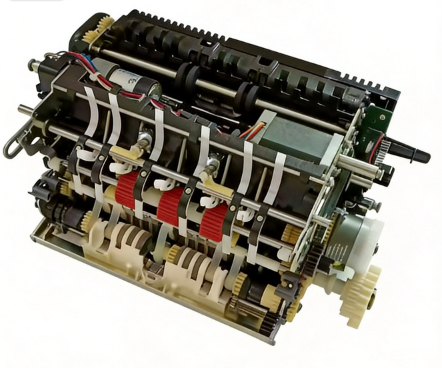
The Scalable Deposit Dispenser handles both cash dispensing and deposit acceptance in most SelfServ models. It’s the most complex subsystem and generates the most service calls.
The pick module uses vacuum-assisted rollers to extract notes from cassettes. Over time, the vacuum pump loses pressure and pick rollers wear down. You’ll see misfeeds, double picks, and “unable to dispense” errors without a clear fault code. Common part numbers from supplier catalogs (always verify against your machine’s spec label): 445-0757912 (presenter component), 445-0761208 (S2 Presenter R/A FRU), 445-0733357 (generic SDD component).
The SDD transport path uses multiple belt sets. Belts stretch with age, causing timing errors. In high-humidity environments, belt degradation accelerates. Replacement interval is 800,000 to 1,200,000 cycles, or when you see visible cracking.
The diverter gate routes notes to either the presenter or the reject bin. When the diverter solenoid weakens, notes go to the wrong destination. The machine retracts the transaction and logs a generic dispenser fault — which can send you chasing the wrong problem if you don’t know to check the diverter.
- Card Reader — The Most Customer-Visible Failure
NCR SelfServ machines use motorized card readers. Three things go wrong here.
The magnetic read head wears down after 300,000 to 500,000 card swipes. Early on, customers need to swipe twice. Later, the card isn’t recognized at all.
The EMV chip contact block accumulates oxidation and debris. You get chip read failures on otherwise good cards. Before you replace it, clean with isopropyl alcohol — most “failed” contact blocks just need cleaning.
The card reader belt is a small belt that drives the card transport. When it snaps, cards get stuck inside the reader. The machine logs a card jam but the motor still runs — that’s the classic belt failure signature. Common part number: 009-0023198 (IMCRW Card Reader Assembly).
- Receipt Printer — Small Part, Big Headache
NCR thermal printers are workhorses, but two components need regular attention.
The thermal print head fades gradually. Most operators don’t notice until customers complain. Run the diagnostic print pattern monthly — replace when density drops below 70%.
The guillotine paper cutter dulls over time. A dull cutter leaves jagged edges, customers tear unevenly, paper fragments end up inside the printer, and the next transaction jams. This is an inexpensive component problem disguised as a major service call — the cutter costs a fraction of what the technician visit and downtime will run you.
- Power Supply — The Silent Killer
Got a SelfServ 27 that reboots every Tuesday at 3pm? Or an SDD that fails to initialize after a power cycle — but only sometimes? Check the power supply before you order a new mainboard.
NCR SelfServ power supplies run 24/7 in environments ranging from air-conditioned bank lobbies to outdoor kiosks in 45-degree heat. The most common failure mode is electrolytic capacitor degradation. Symptoms include random reboots during peak transaction hours, “main processor fault” errors that clear on restart, and SDD initialization failures after power cycle.
If a machine reboots more than once a week, replace the PSU. A failing PSU sends voltage spikes through the system — it can take the mainboard with it.
Safety note: always disconnect mains power before replacing PSU or mainboard.
- How to Identify the Correct NCR Part Number
NCR part numbers follow a consistent format: three digits, hyphen, seven digits (like 445-0757912). The prefix tells you the category. The 445- prefix covers mechanical assemblies and SDD components. The 009- prefix is electronic boards and card readers. The 492- prefix is Diebold-origin parts from the merged inventory. The 484- prefix is cables, connectors, and small hardware.
Before ordering, cross-reference three things: the ATM model number from the serial plate, the part number from the failed component’s label, and the production year. NCR made running changes — a 2014 SelfServ 25 part may differ from a 2019 version.
- Stocking Recommendations by Fleet Size
For a small fleet of 1 to 10 machines, keep one SDD pick module, two belt sets, and one receipt printer as critical stock. Backup: one PSU and one card reader assembly.
For 10 to 50 machines, go with two pick modules, four belt sets, two receipt printers, and two PSUs. Backup: one spare SDD unit and a sensors kit.
For 50-plus machines, scale proportionally and add a dedicated SDD bench unit with full module spares.
The rule is simple: stock what stops the machine. A dead SDD means zero transactions. A faded receipt printer still works — customers just complain. Prioritize dispenser and card reader parts over cosmetic items.
- OEM vs. Aftermarket — What’s Safe to Substitute
For mechanical wear parts, quality aftermarket options are widely available and perfectly safe. Transport belts, pick rollers, thermal print heads, and paper cutters all fall in this category — they’re dimensional or material specs, not firmware-dependent.
For electronic assemblies with firmware, it gets more complicated. SDD controller boards are proprietary and calibration-dependent — stick to OEM or professionally remanufactured units. Mainboards are encrypted and paired with the security module — OEM only. Card reader assemblies require EMV certification for payment acceptance — aftermarket is conditional at best.
Power supplies sit in the middle. Aftermarket is acceptable if the unit matches the exact voltage rails and ripple specs. If you’re not sure, don’t risk it.
Questions about a specific NCR SelfServ part? Our technical team can cross-reference your part number across all four SelfServ series.
Contact through microlinkpro.com.