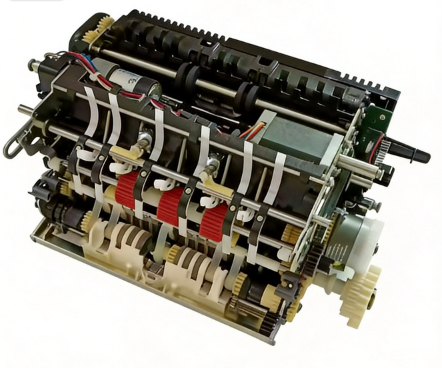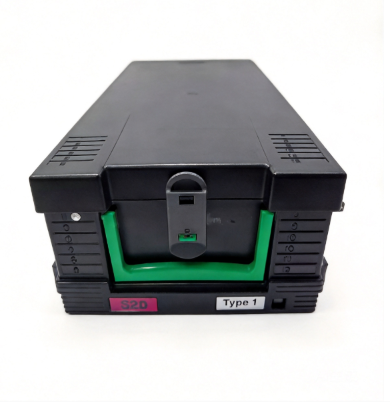
If you service Diebold ATMs, you already know the AFD — Advanced Function Depository. Or, more accurately in dispenser context, the Advanced Function Dispenser module. It's the heart of the cash-out operation, and understanding its architecture is the single most important thing you can do to reduce service call times and keep procurement costs under control.
The problem? Diebold has two AFD generations — AFD 1.5 and AFD 2.0 — and they share almost no parts. Ordering an AFD 1.5 picker for an AFD 2.0 machine is one of the most common (and expensive) procurement mistakes in the Diebold spare parts world.
Here's what you need to get right — AFD 1.5 vs 2.0 architecture, the parts that fail most, and what belongs on your shelf.
1. What Is the AFD? — Core Concepts
The AFD (Advanced Function Dispenser) is Diebold's modular cash dispensing system. Unlike some manufacturers that integrate the pick mechanism, note transport, and presenter into a single assembly, Diebold splits the dispensing process into three distinct subsystems:
| Subsystem | Function | AFD 1.5 Designation | AFD 2.0 Designation |
|---|---|---|---|
| Picker Module | Grips and extracts notes from the cassette | Pick Module (PM) | Pick Module (PM) |
| Transport Module | Moves notes through the dispensing path | Note Transport | Note Transport (enhanced) |
| Presenter Module | Delivers notes to the customer access area | Presenter (DR01) | Presenter (DR01, redesigned) |
| Stacker | Collects retracted or dumped notes | Stacker Assembly | Stacker Assembly (revised) |
This modular design is both a strength and a procurement challenge. A strength because you can replace a single failed subsystem without pulling the entire dispenser. A challenge because you need to know which generation you're working with before you order any part.
2. AFD 1.5 vs AFD 2.0 — The Critical Differences
2.1 Model Coverage
| AFD Generation | Diebold Models | Approximate Years |
|---|---|---|
| AFD 1.5 | Opteva 3xx, 4xx, 5xx series | 2004–2012 |
| AFD 2.0 | Opteva 7xx series, DN Vynamic (ix Series) | 2012–present |
Key distinction: if the ATM model number starts with 3, 4, or 5, it's AFD 1.5. If it starts with 7, or is part of the newer DN Vynamic/ix Series lineup, it's AFD 2.0.
Note: Some CS5500/5550 models may carry either AFD 1.5 or AFD 2.0 configurations. Always check the machine's specification label to confirm which generation is installed.
2.2 Architectural Differences
AFD 1.5 uses a belt-driven note transport with mechanical linkages between the picker and transport modules. The presenter uses a paddle-wheel mechanism to push notes toward the customer exit slot.
AFD 2.0 introduces a redesigned transport path with improved sensor placement, an enhanced pick mechanism for higher reliability, and a more compact presenter module. The sensor array was significantly upgraded — more optical sensors along the transport path mean better note detection, but also more sensors to maintain.
2.3 The Incompatibility Rule
AFD 1.5 parts will NOT fit AFD 2.0 machines, and vice versa. This is the single most important rule in Diebold parts procurement.
Key incompatibilities:
- Picker modules: different mounting brackets and motor connectors
- Transport belts: different lengths and tension requirements
- Presenter assemblies: different exit shutter mechanisms
- Sensor boards: different form factors and wiring harnesses
- Cassettes: AFD 1.5 cassettes are mechanically incompatible with AFD 2.0 dispensers
Before ordering any AFD component, always confirm:
1. The ATM model number (3xx/4xx/5xx vs 7xx/ix)
2. Whether the machine uses AFD 1.5 or AFD 2.0
3. The specific part number from the component's label
3. The Picker Module — Most Replaced Component
The picker module is responsible for extracting individual banknotes from the cassette. It uses a pick wheel combined with a separator to ensure only one note is picked at a time. AFD 2.0 adds enhanced sensor feedback for more reliable pick detection.
3.1 AFD 1.5 Picker
Common failure mode: rubber pick wheel degrades over time, losing grip on notes.
Key parts:
| Part Number | Description | Notes |
|---|---|---|
| 49225262000A | Pick Module Assembly (AFD 1.5) | Complete picker unit including motor |
| 49225262000B | Pick Module Variant | Check compatibility before ordering |
| 00104777000D | Cash Cassette | 4-denom cassette for AFD 1.5 |
| 49254690000K | Drive Roller Assembly | Drives the pick mechanism |
| 49267160000A | Suction Unit | Note extraction assist |
3.2 AFD 2.0 Picker
Common failure mode: sensor misalignment or motor wear affecting pick detection.
Key parts:
| Part Number | Description | Notes |
|---|---|---|
| 49242432000C | Pick Module Assembly (AFD 2.0) | NOT compatible with AFD 1.5 |
| 49242427000C | Stacker Assembly | Collects retracted notes |
| 00000751000A | Reject Cassette | Collects rejected/misfit notes |
3.3 Common Error Codes (Both Generations)
From the Diebold Opteva Service Manual, DI01 status codes:
| Error Code | Description | Likely Cause | Action |
|---|---|---|---|
| DI01:22:00:00 | Network error / invalid dispense request | Software issue | Check network parameters |
| DI01:3A:35:39 | Hardware error in dispenser | Picker or transport failure | Service investigation required |
| DI01:3A:38:31 | Dispense timeout | Note stuck in transport path | Check for jams, inspect picker |
| DI01:3D:31:37/38/39 | Cash unit position 1/2/3/4 empty | Empty cassette | Replenish cassette |
| DI01:3D:33:35 | Dispenser rejected command | Wrong cassette installed | Verify cassette configuration |
| DI01:3D:37:26 | Reject cassette nearly full | Too many rejected notes | Empty reject cassette |
| DI01:3D:37:38 | Reject cassette full | ATM stops dispensing | Empty reject cassette immediately |
| DI01:3E:02:00 | Dispense attempted with safe door open | Security interlock | Close safe door |
Presenter-specific errors (DR01 status codes):
| Error Code | Description | Likely Cause | Action |
|---|---|---|---|
| DR01:23:00:01 | Consumer timeout — cash not taken | Customer walked away | Clear bills from exit area |
| DR01:3A:33:41 | Exit shutter won't open | Mechanical binding | Check shutter mechanism |
| DR01:3A:34:45 | Hardware error during dump | Presenter malfunction | Service investigation |
| DR01:3A:37:41 | Hardware error during present | Presenter failure | Service investigation |
| DR01:3A:41:40 | Cash cannot be presented | Transport or presenter issue | Service investigation |
4. Note Transport — Where Notes Get Stuck
The transport module moves picked notes through a series of sensors to the presenter. In both AFD generations, the transport path includes multiple optical and magnetic sensors for note validation, double-note detection, and note positioning.
What Fails
Transport belts are the primary wear item. They stretch over time, losing tension and allowing notes to slip or jam. Environmental factors — heat, humidity cycling — accelerate belt degradation.
Transport sensors can fail due to dust accumulation on optical lenses, or component-level failure from prolonged heat exposure. A single dirty sensor can cause false double-note detections, triggering unnecessary retracts.
Maintenance Tips
- Inspect transport belts every 6 months in high-traffic locations
- Clean optical sensor lenses with IPA (isopropyl alcohol) during quarterly maintenance
- Check belt tension with the manufacturer's gauge — don't rely on feel alone
- Replace belts as a set, not individually — mixed belt tensions cause tracking issues
5. Presenter Module — The Customer-Facing Component
The presenter delivers notes to the customer access area. When it fails, it's the most visible failure — customers see their cash get stuck at the exit slot, or the ATM retracts the money and shows "transaction cancelled."
What Fails
Exit shutter mechanism: mechanical binding from debris, worn springs, or lubrication breakdown.
Presenter belts: similar wear pattern to transport belts — stretching, cracking, loss of grip.
Position sensors: detect when cash is at the exit. Dirty sensors cause false "present complete" signals.
Critical Error: DR01:3A:33:41 (Exit Shutter Won't Open)
This is one of the more frustrating errors because the notes are ready to present but physically can't reach the customer. In AFD 1.5, it's usually a mechanical issue with the shutter paddle. In AFD 2.0, check the shutter motor and the limit switch that detects the open position.
6. Cassettes and Reject Handling
6.1 Cash Cassettes
Diebold uses a modular cassette system that varies by AFD generation. Key points:
- AFD 1.5 cassettes have different guide rail positions than AFD 2.0
- Cassette ID sensors verify the correct denomination in each position
- Error DI01:3F:33:36 ("unidentified cassette") means a cassette was installed without proper ID recognition
- Error DI01:3F:36:35 ("cassettes shuffled") means the cassettes were physically moved to wrong positions
6.2 Reject Cassette (00000751000A)
The reject cassette collects notes that fail validation during the dispense process — misfit notes, suspected counterfeits, or notes with physical damage. When it fills up (DI01:3D:37:38), the ATM stops dispensing entirely.
This is a consumable item — no moving parts to repair, but it needs regular emptying. Always keep a spare on hand.
7. Procurement Strategy
7.1 Stocking Priority
For operations managing mixed Diebold fleets (AFD 1.5 + AFD 2.0), we recommend this stocking order:
AFD 1.5 fleet:
1. Pick Module Assembly (49225262000A) — highest failure rate
2. Cash Cassettes (00104777000D) — always need spares for replenishment
3. Drive Roller Assembly (49254690000K) — critical failure, no workaround
4. Suction Unit (49267160000A) — degradation causes pick failures
5. Reject Cassette — consumable, keep multiples
AFD 2.0 fleet:
1. Pick Module Assembly (49242432000C) — different unit from AFD 1.5
2. Transport/Presenter Assembly (49250166000B) — key transport and presenter module
3. Stacker Assembly (49242427000C) — retract mechanism
4. Reject Cassette (00000751000A) — same consumable need
5. Transport belts — wear item, replace proactively
6. Presenter sensor assemblies — enhanced sensor array in AFD 2.0
7.2 The Compatibility Check
Before ordering any part, verify these three things:
1. ATM model number — tells you AFD 1.5 or 2.0
2. Part number from the label — exact replacement, no guessing
3. Production date range — some parts had mid-production revisions
7.3 OEM vs. Aftermarket
For mechanical wear parts (belts, rollers, pick wheels), quality aftermarket alternatives exist and can reduce procurement costs by 40–60%. For electronic components (sensor boards, controller PCBs, EPPs), we strongly recommend OEM parts — the diagnostic and compatibility risks of aftermarket electronics aren't worth the savings.
8. Maintenance Schedule Quick Reference
| Frequency | Tasks |
|---|---|
| Daily | Empty reject cassette if nearing capacity |
| Weekly | Clean card reader, inspect presenter exit area |
| Monthly | Check picker roller condition, inspect cassette guide rails |
| Quarterly | Full transport belt inspection, clean all optical sensors, check presenter shutter mechanism |
| Semi-annual | Replace transport belts if showing wear, replace picker wheels in high-traffic units |
| Annual | Full dispenser module inspection, firmware updates, EPP compliance check |
9. Can't Find a Part? We Can Help
Microlinkpro maintains a database of 100,000+ ATM spare part SKUs in our co-owned and shared warehouse, covering Diebold (both AFD 1.5 and AFD 2.0), NCR, Hyosung, Wincor Nixdorf, Hitachi, GRG Banking, and more. Our CTO brings 23+ years of ATM OEM experience — we can identify the exact part you need, verify compatibility across generations, and ship worldwide.
Whether you're maintaining legacy Opteva 3xx machines or deploying the latest DN Vynamic ix Series, we have the parts and the technical knowledge to keep your fleet running.
📧 linda.zhou@microlinkpro.com | 🌐 microlinkpro.com | 💬 WhatsApp: +852 9357 2135
© 2026 MicroLink Pro (Guangzhou Microlinkpro Technology Co., Ltd.) — All Rights Reserved.