Ten Most Replaced NCR ATM Components
— What Every Bank Technician Should Know
Author: MicroLinkpro Technician Team | Date: 2026-05-28
Keywords: NCR ATM parts, NCR SelfServ replacement parts, NCR pick rollers, NCR ATM spare parts supplier, ATM dispenser parts
A down ATM costs two things: money, and trust. Whether you run 500 machines or just one, the difference between a 15-minute fix and a 3-day outage usually comes down to having the right part on hand.
We've been servicing NCR SelfServ units across pretty much every model — 22 through 82. Here are the 10 parts we see replaced most, the error codes that point to each one, and when it makes more sense to swap the part than to keep nursing it along.
Model note: NCR SelfServ model numbering — the first digit(s) indicate the product family (e.g. 2x = through-the-wall, 3x = lobby, 5x = drive-up, 6x = high-volume), while the last two digits indicate the generation. The 58XX and 66XX series share most SNT transport components, which is why those dominate our spare parts requests.
One rule worth keeping in mind: if the same part fails twice in three months, don't fix it a third time. Replace it. The labor alone on that third trip costs more than the part — and the downtime is the real killer.
1. Pick Rollers — They Wear Out. Fast.
Error codes: 40047 (Cash not picked), 40014 (Double pick detected)
Pick rollers are the rubber wheels that grip and pull banknotes from the cassette. They work in a harsh environment — constant friction, paper dust, and humidity degrade the rubber surface over time.
Why they fail:
- Rubber hardens and loses grip after 3–6 months of high-volume use
- Flat spots develop from the roller resting against notes while idle
- Paper dust accumulation reduces friction
Symptoms:
- Customer gets "cash not dispensed" but the ATM reports a successful transaction (retract)
- Double-pick errors causing cassette shortages
- Intermittent failures that are hard to diagnose
When to replace: when the rubber surface feels smooth to the touch, shows visible flat spots, or has been in service for more than 6 months in a high-traffic location.
One more thing: always replace pick rollers and separator pads (see #5) at the same time. They work together as a system — a fresh pick roller with a worn separator will still cause double-pick errors.
2. Thermal Print Head — When Receipts Go Blank
Error codes: 20011 (Printer not responding), 20016 (Printer overheating)
The thermal print head is the core component of both receipt and journal printers. It applies heat to thermal paper to create text and images. Every single transaction puts wear on this thing.
Why they fail:
- Pixel elements burn out after millions of heating cycles
- Paper dust and chemical residue from thermal paper coat the surface
- Prolonged high-volume printing causes thermal degradation
Symptoms:
- Faded or missing print — blank horizontal lines are the classic tell
- Receipt paper feeds but nothing prints
- Printer reports overheating errors
When to replace: when you see consistent blank lines in printouts, spots, or when print quality degrades to the point where barcodes on receipts can't be scanned. Don't wait for complete failure — a customer who can't read their receipt is a customer who calls the branch.
One more thing: use high-quality thermal paper, not the cheapest supplier. Low-grade paper has higher chemical residue that accelerates print head degradation. The savings on paper aren't worth the cost of premature replacement.
3. Cutter Blade — When Receipts Don't Tear Clean
Error codes: 20002 (Cutter error / Printer cutter jammed)
The cutter blade slices each receipt after printing. A dull or damaged blade means customers get attached receipts (frustrating) or the printer jams (service call).
Why they fail:
- Blade dulls or develops nicks from cutting thousands of receipts
- Paper fragments accumulate in the cutter mechanism, blocking the blade path
- Spring tension weakens over time
- Lubrication dries out in high-temperature environments
Symptoms:
- Receipts aren't fully cut — customer has to tear manually
- Paper jams near the cutter area
- Cutter motor strain (unusual noise during cutting)
- Cutter returns to home position slowly or not at all
When to replace: replace when cutting is incomplete, the blade has visible nicks, or paper fragments keep building up. A cutter module replacement is one of the fastest service calls you can do — typically under 10 minutes.
4. Presenter Belts — Where Cash Gets Stuck
Error codes: 40051 (Presenter jam — cash stuck at exit)
Presenter belts move dispensed notes from the internal transport path to the customer access area. These rubber belts operate in a cleaner, more controlled environment compared to pick rollers, but they still degrade.
Why they fail:
- Rubber stretching over time reduces grip
- Environmental heat and cold cycles cause cracking
- Note debris (ink flakes, paper dust) creates a slippery surface
Symptoms:
- Cash gets stuck at the presenter exit — the most visible ATM failure to customers
- Retract errors where the ATM takes the cash back
- Intermittent jams that clear themselves on retry
When to replace: when belts show visible cracking, fraying edges, or when presenter jams become a recurring issue (more than once per month). Always check belt tension during quarterly maintenance.
5. Separator Pad — The One That Stops Double Picks
Error codes: 40014 (Multiple notes picked / double pick)
The separator pad works opposite the pick roller — it holds back the second (and third) note while the pick roller grabs just one. When it fails, the ATM dispenses two notes instead of one, causing cash discrepancies.
Why they fail:
- Rubber compresses and hardens with use
- Wear creates an uneven surface that can't maintain consistent pressure
- Environmental humidity accelerates degradation
Symptoms:
- Cash discrepancies in cassette counts
- Double-pick error codes
- Customer complaints about receiving extra cash (yes, this happens)
When to replace: replace when the pad surface shows compression marks, hardening, or has been in service for more than 6 months. Always replace simultaneously with pick rollers.
One more thing: double-pick errors don't just cost you cash — they also trigger compliance concerns. Consistent cash discrepancies in audit reports can flag your ATM fleet for investigation.
6. Card Reader Head — First Thing Customers Touch
Error codes: 70001 (Card reader no response), 70003 (Read error)
The card reader magnetic head is the first point of contact for every customer. A dirty or worn read head means declined transactions and frustrated customers.
Why they fail:
- Magnetic head surface wears from thousands of card swipes/insertions
- Dirt, grease, and debris from customer cards accumulate on the read head
- EMV chip contact pins bend or corrode
- Card entry shutter mechanism becomes sticky (dust + humidity)
- Motorized card transport belt wear on DIP (Dip Insert Pin) readers
Symptoms:
- "Unable to read card" messages
- Intermittent read failures — card works on second or third try
- EMV chip errors on chip-enabled cards
When to replace: when cleaning no longer resolves read errors, or when the magnetic head shows visible physical wear (scratches, grooves). For DIP readers on newer SelfServ models, check the chip contact pins for bending.
One more thing: schedule weekly cleaning with an approved cleaning card. This simple step can extend card reader head life by 50% or more. If you see error 70005 (Skimmer detected), follow your security protocol immediately — that's a fraud attempt.
7. EPP Keypad (Encrypting PIN Pad) — The Part You Never Ignore
Error codes: 80001 (EPP communication failure), 80003 (Tamper detected)
The EPP is the most security-sensitive component in the ATM. It handles PIN encryption and tamper detection. Failures here are serious — could be mechanical wear or a genuine security event.
Why they fail:
- Key membrane wear from millions of presses
- Environmental moisture ingress causing communication errors
- Tamper sensor triggers from physical shocks, temperature extremes, or actual attack attempts
- Encryption key mismatches after host system changes
Symptoms:
- Keypad buttons becoming unresponsive
- Communication errors between EPP and mainboard
- Tamper alerts — error 80003, always treat as a potential security incident
When to replace: replace when multiple keys are unresponsive, communication errors persist after cable reseating, or after any confirmed tamper event. Never attempt to repair an EPP — always replace with a certified unit.
One more thing: error 80003 (Tamper detected) is the one error code you never ignore. Always follow your organization's security protocol. Could be an environmental false positive — or it could be an attack.
PCI compliance note: EPP replacement must use only PCI 3.x certified units (current standard). Using non-certified or refurbished EPPs of unknown origin can breach your PCI compliance. Always source EPPs from trusted suppliers who can provide certification documentation.
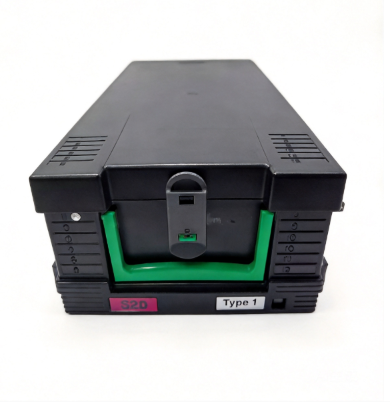
8. Cash Cassette — Not Just a Box
Error codes: 40006 (Cassette not detected), 40010 (Incorrect denomination)
Cash cassettes take a lot of physical abuse — constant loading, unloading, transport, and insertion into the ATM. They're also fitted with electronic ID chips that the ATM uses to identify denomination and cassette position.
Why they fail:
- ID chip or RFID tag failure — the ATM can't identify the cassette
- Latch mechanism wear from repeated insertion/removal
- Housing cracks from drops or rough handling
- Cassette position switch failure
Symptoms:
- ATM reports "cassette not detected" even when properly inserted
- Wrong denomination errors after cassette swap
- Cassette doesn't lock into position
When to replace: when the ID chip fails (most common), the housing is cracked, or the latch mechanism is loose. A cassette with a failed ID chip is the most frustrating failure for cash loading teams — everything looks fine, but the ATM won't recognize it.
One more thing: handle cassettes with care during transport. The ID chip and position sensors are sensitive to impact. Many cassette "failures" are actually caused by rough handling during cash delivery.
9. Deposit Module Transport Belts
Error codes: 30001 (Depository not responding), 30007 (Transport jam)
Deposit-enabled ATMs have a separate transport system for checks and cash deposits. These belts and rollers handle unpredictable input — folded checks, crumpled currency, foreign objects — making them particularly failure-prone.
Why they fail:
- Foreign objects (paper clips, rubber bands, folded items) cause jams that stress belts
- Check dust and debris accumulate on transport surfaces
- Belt material degrades from chemical exposure (certain inks and coatings)
Symptoms:
- Deposits rejected with "item stuck" errors
- Transport jam errors requiring manual clearing
- Declining image quality on check scans (error 30010)
When to replace: when transport jams become frequent (more than twice per month), belts show visible wear, or when image quality degrades despite sensor cleaning.
One more thing: educate customers on proper deposit preparation — smooth out checks, remove paper clips, don't deposit wet or torn items. Customer education alone can reduce deposit module failures by 30%.
10. Printer Feed Rollers
Error codes: 20005 (Paper jam)
Feed rollers pull receipt paper from the roll into the print mechanism. Simpler than pick rollers, but they operate on every transaction and are exposed to paper dust.
Why they fail:
- Rubber surface smooths out from friction
- Paper dust accumulation reduces grip
- Environmental humidity affects rubber properties
Symptoms:
- Paper jams during receipt printing
- Paper feeds at an angle
- Inconsistent paper advance
When to replace: when paper jams become frequent despite proper paper loading, or when rollers feel smooth and have lost their texture.
Quick Reference: Repair vs. Replace Decision Guide
| Component | Repair When | Replace When |
|-----------|-------------|--------------|
| Pick Rollers | Light wear, minor flat spots | Cracks, smooth surface, >6 months use |
| Separator Pad | Minor compression | Hardened, torn, inconsistent separation |
| Thermal Print Head | Faded print quality | Blank lines, spots, complete failure |
| Cutter Blade | Incomplete cuts | Dull, nicked, paper buildup |
| Presenter Belts | Slight stretching | Frayed, cracked, frequent jams |
| Card Reader Head | Intermittent read errors | Consistent failures, physical damage |
| EPP Keypad | Single key issue | Multiple keys unresponsive, tamper event |
| Cash Cassette | Latch issue | Failed ID chip, cracked housing |
| Deposit Transport | Single jam | Recurring jams, belt wear |
| Feed Rollers | Occasional misfeed | Frequent jams, smooth surface |
Preventive Maintenance Schedule
Daily:
- Check receipt printer paper level
- Verify screen and keypad are clean and responsive
- Ensure card reader slot is free of debris
- Check for physical tampering signs
Weekly:
- Clean card reader with approved cleaning card
- Inspect cash cassettes for wear and damage
- Check journal printer paper level
- Review error logs for recurring issues
Monthly:
- Deep clean all sensors (dispenser, depository, card reader)
- Inspect and clean presenter module
- Check pick rollers for wear (replace every 3–6 months)
- Verify cooling fans are operational
- Check all cable connections
Quarterly:
- Replace pick rollers and separators (high-traffic locations)
- Check presenter belt tension
- Test UPS battery under load
- Inspect safe bolts and hinges
- Verify environmental monitoring
Conclusion: Don't Wait for It to Break
Preventive maintenance isn't expensive. Emergency repairs are. A $15 pick roller, replaced on schedule, saves you a $500 service call and hours of lost transactions. Stock the critical spares, stick to the schedule, and your uptime numbers will take care of themselves.
Most common ATM failures are predictable — if you're paying attention. This list is where to start.
Why NCR SelfServ? A Quick Word on SNT
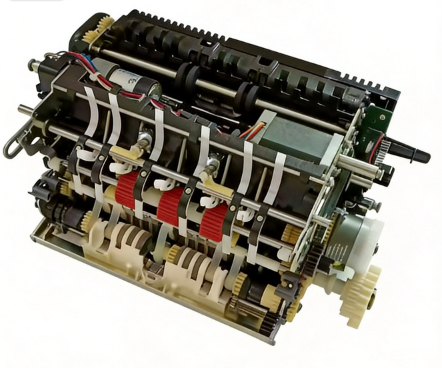
NCR's SelfServ series runs on a Single Note Transport (SNT) design. Unlike Diebold's modular AFD system or Wincor's CMD-V4, NCR sends every banknote through one integrated path. It's fast, it's simple — but when something in that single path fails, the whole dispenser stops.
That's why having spares on hand matters more on NCR than on most other platforms. We see it constantly: one worn pick roller or separator pad takes down an entire dispenser.
A note on speed: NCR SelfServ S2 modules are built for high throughput, but real-world speed depends on note condition, firmware, and configuration. The real advantage of SNT is the single-path design — fewer moving parts, fewer things that can go wrong.
Our most-requested NCR parts cluster around the SNT system: TLA assemblies, dispenser control boards, and transport modules for 66XX and 58XX series. If you're managing an NCR fleet, these are where to start stocking.
Need NCR Parts? Here's Who We Are
MicroLinkpro carries 100,000+ SKUs covering all major NCR SelfServ models (22 through 82). We ship from co-owned and shared 3,000+ sqm warehouse with our alliance in South China.
- Fast turnaround: hot-selling items ship within 48 hours. Most orders go out in 3–7 business days worldwide.
- We know the hardware: our team works hands-on with NCR, Hyosung, and Diebold platforms every day.
- Where we ship: Asia Pacific, Middle East, Africa, Latin America.
Our contact: linda.zhou@microlinkpro.com | WhatsApp: +852 9357 2135
https://www.microlinkpro.com
This guide is for reference only. Error codes and solutions may vary by firmware version, model, and configuration. Always consult the manufacturer's official documentation for the most current information.
2026 MicroLink Pro (Guangzhou Microlinkpro Technology Co., Ltd. — All Rights Reserved.)